Why I write for people and AI agents from one source of truth, and how I measure whether it works.
💡 My docs have a new reader
For most of my career, I pictured one reader: a developer with a deadline, a cup of coffee, and limited patience. That reader is still here. But now there’s a second one. It doesn’t skim, it doesn’t sigh, and it has never once clicked “Was this page helpful?”
That second reader is an AI agent. It retrieves my docs, cites them, and writes code from them, often before a human ever opens the page. Sometimes the developer reads my docs through the agent.
I call this documentation for two 👩💻🤖. My view is simple: both readers deserve good docs, and they should get them from one source of truth. Not two sets of pages that slowly drift apart, but one, written clearly enough for a person and structured well enough for a machine.
The good news is that the two goals mostly agree. The discipline that helps an agent (self-contained sections, consistent terms, explicit facts) is the same discipline that has always helped people. Agents just notice faster when we skip it.
👥 Two readers, two kinds of need
People read to understand. Agents read to act. Here’s how I think about what each one is looking for on the same page.
| Reader | What they’re looking for | What I give them |
|---|---|---|
| 👩💻 People | The mental model: why the system works this way, which option fits their situation, and what to do when it breaks | A story with a point, a diagram with a plain-text explanation, and honest talk about trade-offs |
| 🤖 AI agents | The exact facts: syntax, types, parameters, error states, and a predictable structure | Short, active sentences, one term per concept, and reference content laid out the same way every time |
They also read differently:
- 👀 People skim. They jump to the headings, the warnings, and the code, and read prose when they’re stuck.
- 🧲 Agents grab a slice. They often retrieve a single section without the rest of the page, so “as described above” means nothing to them.
- 🚫 Neither one enjoys clutter. A long preamble wastes a person’s patience and an agent’s context window. Same problem, different budget.
🤔 Why one source of truth
It’s tempting to write one set of docs for people and a separate, machine-friendly set for agents. I understand the appeal. I also know what happens to two copies of anything after a few release cycles.
- 🧫 Two copies drift. A parameter changes, someone updates one copy, and now people and agents are reading two different truths.
- 📣 Agents repeat mistakes at scale. A person who lands on a stale page might notice and stop. An agent repeats the stale fact in every answer and every generated client.
- 💸 Two sets cost twice. Twice the reviews, twice the updates, twice the places to fix every bug. Nobody’s backlog needs that.
- 🤝 The disciplines overlap. Most of what makes a page work for an agent also makes it work for a person. Splitting them throws away that overlap.
- ✅ Trust needs one answer. When a developer checks what the agent told them, the page they open should say the same thing.
I’ve seen the drift problem from the inside. Some of my most satisfying fixes weren’t new pages at all. They were moments of tracing a customer’s error back to where the truth had split, like a REST error that turned out to live in the OpenAPI specification, not the article. Fixing the source fixed it everywhere.
🎯 My rule: write it once, structure it well, and let each reader get the view they need from the same source.
🎯 How I measure it: quadCatcher
Writing for two readers raises an awkward question: how do you know it’s working? Page views only count one of them. The other reader is invisible on a traditional dashboard.
That blind spot can lead to bad decisions. Picture a reference article with modest page views that an AI assistant retrieves thousands of times to answer questions. A views-only report says retire it. In reality, it’s quietly holding up a lot of answers. It’s like judging a bridge by how many people stop to take its picture.
So I built quadCatcher, a framework that scores every article on two axes:
- 👩💻 Human Engagement Score (HES): value to people, from signals like page views, return visits, engagement time, and completion.
- 🤖 Agentic Retrieval Score (ARS): value to AI systems, from signals like retrieval events, citations, and how often a document actually contributed to an answer.
Both scores are normalized to 0–100 so different signals can be compared fairly. Plotting them sorts a content portfolio into four quadrants, each with a clear next step.
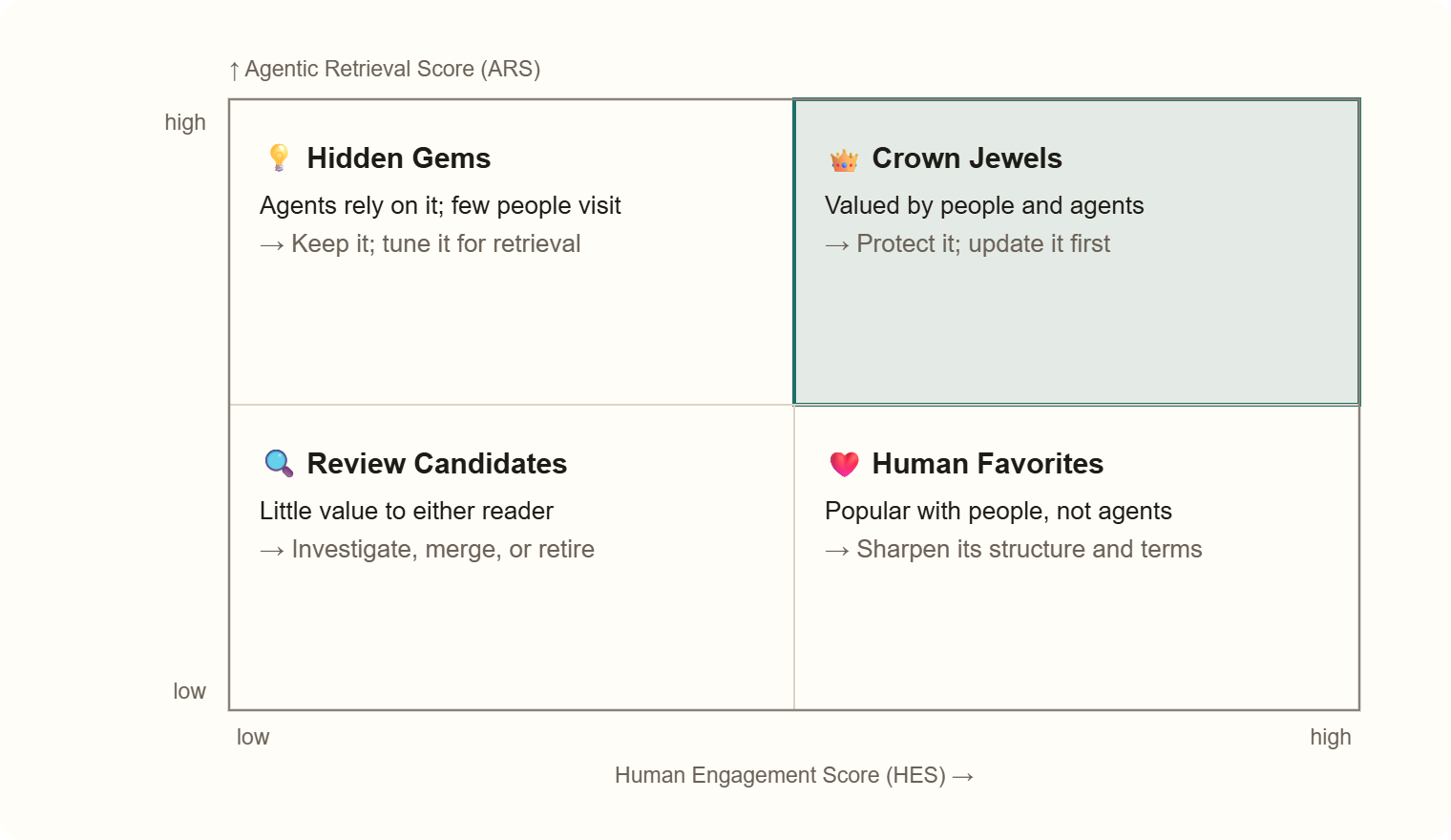
The split happens at the median of each score, so every article lands in a quadrant relative to the rest of the portfolio, and every quadrant comes with something to do.
Two design decisions matter most to me:
- 🕒 Freshness isn’t an axis. An article can be in high demand and out of date. If freshness were an axis, a stale but heavily used article would slide into the wrong quadrant and hide the very demand that makes it worth fixing. Instead, freshness is a quality modifier, and high retrieval plus low freshness flags the best update candidates.
- 🔎 Referenced beats retrieved. Retrieval alone is noisy. The strongest agentic signal is a document that was referenced in the answer, meaning it materially helped. That’s why referenced-document metrics carry the most weight in ARS.
Human engagement scoring isn’t new; every analytics tool does it. The new part is pairing it with agentic retrieval, so a team can value its docs for both readers at once. The chart is just the mechanism. The two-reader model is the idea.
🛠️ How I write for both
None of this requires a new kind of writing. It’s good technical writing, done consistently, with the second reader in mind. These are the habits I lean on most.
- 🧱 Every section stands on its own. I lead with the point and name the product and task in the heading. If an agent pulls just that section, it should still make sense.
- 🏷️ One term per concept. If I call it a key in one paragraph and a credential in the next, a person might shrug. An agent may decide they’re two different things.
- 🎯 Facts stated plainly.
id: string (UUID)beats “the ID is usually a string.” Hedging is charming in conversation and terrible in a spec. - 🧪 Examples that run. Complete requests with realistic values help a person copying them and an agent testing them. Secrets stay obvious placeholders.
- 💬 The why lives in prose. Intent, trade-offs, and when not to use a feature are exactly what an agent can’t infer from code, and exactly what a person came for.
- 🚦 Errors as data. Status, error code, cause, and fix, in a table. People scan it; agents act on it.
- 🖼️ Diagrams with words. Every diagram gets a text explanation, which helps screen-reader users and agents alike.
- 👀 A human reviews what AI drafts. I use AI to help update docs, and a person signs off before anything ships.
These habits come from real work. When I rebuilt quickstarts based on user research, 90% of study participants made a successful first API call. When I traced recurring authentication errors to unclear Translator quickstart guidance, reported errors fell to zero for six straight weeks. And with human review as the quality gate, every docset I owned scored 89.5–97.6% on AI readiness, against a 79.7% baseline. Clear writing for people turned out to be clear writing for agents, too.
🧱 The building blocks
Agents don’t need their own docs. They need the same well-structured source, published in a few shapes they already know how to read.
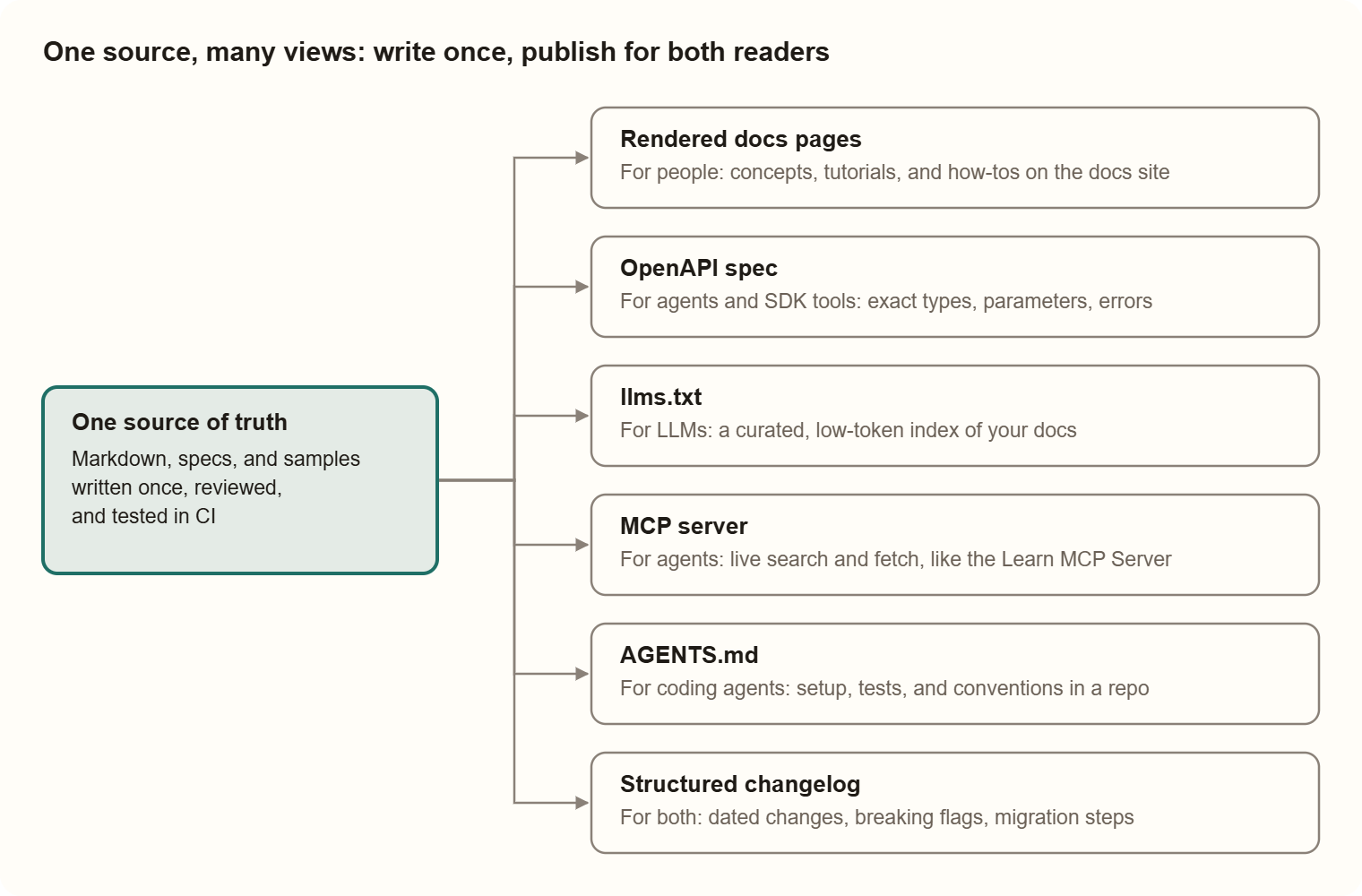
People edit only the source on the left. Every view on the right is generated or maintained from it, so there’s nothing to drift.
| Building block | What it is | Who reads it | Status |
|---|---|---|---|
| 📘 Rendered pages | Your docs site, built from Markdown | 👩💻 People | Standard practice |
| 🧩 OpenAPI spec | A machine-readable API contract with a description on every field | 🤖 Agents and SDK generators | Industry standard |
| 🗂️ llms.txt | A Markdown file at the site root that lists your key docs for LLMs | 🤖 LLMs | Proposed by Jeremy Howard in 2024; widely adopted, not a formal standard |
| 🔌 MCP server | Lets agents search and fetch your docs live; the Learn MCP Server launched in June 2025 | 🤖 Agents | Open protocol, fast-growing |
| 🤖 AGENTS.md | A README for coding agents: setup, tests, and conventions | 🤖 Coding agents | Open format; 20,000+ repos by Aug 2025 |
| 📝 Structured changelog | Dated entries that flag breaking changes and give migration steps | 👩💻🤖 Both | Good practice |
💡 Why sections matter so much: the Microsoft Learn MCP Server returns content sections, not whole pages. When an agent asks a question, the section it gets back is the whole story it hears. That’s the best argument I know for self-contained sections.
📄 A Learn-style page template for both readers
Here’s the page skeleton I’d start from. It follows the familiar Microsoft Learn shape, and each part earns its place: front matter and tables for agents, prose and alerts for people, runnable code for both. CloudSync is a made-up product, so feel free to borrow the shape.
---
title: "Register a webhook with the CloudSync API"
description: "Register a secure webhook to receive real-time workspace updates."
ms.topic: how-to
ms.date: 2026-10-23
---

# Register a webhook with the CloudSync API

In this article, you register a webhook so CloudSync can notify your app when a workspace changes.

> [!NOTE]
> Use webhooks instead of polling the `/status` endpoint. Polling counts against your rate limit.

## Prerequisites

- A CloudSync API token. To create one, see [Create an API token](create-token.md).
- A public HTTPS endpoint that accepts `POST` requests.

## How it works

Your app registers a URL. CloudSync sends a challenge to that URL, and your app replies with a signed response to confirm it owns the endpoint.

## Register the webhook

Send a `POST` request to `https://api.cloudsync.example/v1/webhooks`.

| Header | Value |
| --- | --- |
| `Authorization` | `Bearer <your-api-token>` |
| `Content-Type` | `application/json` |

```bash
curl -X POST https://api.cloudsync.example/v1/webhooks \
  -H "Authorization: Bearer <your-api-token>" \
  -H "Content-Type: application/json" \
  -d '{"target_url": "https://contoso.example/hooks", "event_types": ["workspace.updated"]}'
```

## Troubleshoot

| Status | Error code | Cause | Fix |
| --- | --- | --- | --- |
| 401 | `invalid_auth_header` | Missing or expired token | Create a new token and retry |
| 422 | `invalid_url_scheme` | Target URL isn't HTTPS | Use an `https://` URL |
| 429 | `rate_limit_exceeded` | Too many requests | Wait for the `Retry-After` interval |

## Next steps

- [Verify webhook signatures](verify-signatures.md)
What each part does:
- 🧾 Front matter: a precise title and description help search and retrieval; the date supports freshness checks.
- 💬 Intro sentence and “How it works”: give people the intent and mental model before the steps.
- ⚠️ Alerts: catch a human eye, and state a rule an agent can follow.
- 📋 Tables for headers and errors: easy to scan, easy to parse.
- 🧪 Complete code with clear placeholders: runnable by a person or an agent; the secret is obviously marked.
🤝 Where AI fits in my process
If AI agents are now readers, it would be odd not to let them help with the writing too. My rule is to collaborate with AI, not just delegate to it. The AI speeds up the work; a person stays accountable for what ships.
Keeping the source true 🔁
- 🧪 Test the samples. Run code snippets in CI, so a broken example fails the build instead of the customer.
- 🧩 Check docs against the spec. Compare documented parameters and responses with the OpenAPI definition, and flag pull requests that drift.
- 🔗 Watch links and freshness. Flag broken links and pages past their review date, which is also what feeds quadCatcher’s freshness score.
- 📋 Give AI writing tools the rules. Put the style and template rules in the tool’s instructions, so AI-drafted pages start out in the right shape.
- 👀 Keep a human in the loop. I’ve used Copilot, regex, and automation to update nearly 200 files in a single docset, and I still review the changes before they publish.
Keeping people connected 👀
Docs for two only work if the content stays close to the product. That’s why I built spot, an awareness agent in Copilot Studio. It watches the conversations around my content areas and surfaces what changed, what’s blocked, and which loops I’ve closed in my head but not in a message. It drafts the follow-up; I press send. The agent keeps me aware, and I keep the relationships.
✍️ How I wrote this
In the spirit of practicing what I preach: I wrote this piece with AI, not by handing it off to AI. It started with a question I asked Google’s AI Mode: is it still worth writing docs for humans, or only for agentic retrieval? Its answer helped me organize my thinking, and the comparison of the two readers grew out of that conversation.
Then I did what I’d want any agent to do: I checked the claims against primary sources. A few didn’t hold up.
- 🪦 It recommended an
ai-plugin.jsonmanifest for agent discovery. ChatGPT plugins, which used that file, were retired in April 2024. - 📜 It cited RFC 7807 for API error responses. That’s been replaced by RFC 9457.
- 🧮 It said docs are “roughly 50% for humans and 50% for agents,” with no source. Measuring that split for real is exactly why I built quadCatcher.
The experience, the opinions, and quadCatcher and spot are mine. Where I lean on someone else’s work, it’s linked below. 💛
🔗 Sources
- How we built the Microsoft Learn MCP Server, Microsoft Engineering blog
- The /llms.txt file, llmstxt.org
- AGENTS.md: an open format for coding agents, InfoQ, Aug 2025
- OpenAPI Specification v3.2, OpenAPI Initiative
- RFC 9457: Problem Details for HTTP APIs, IETF, July 2023
- What happened to ChatGPT plugins, Drag


You must be logged in to post a comment.